


I bought a PlayStation 5 (PS5) about a year and a half ago and, in that time, probably spent a couple of hours playing games on it. I’m not particularly adept with a controller, so the PS5 never really grabbed me and has more or less been there gathering dust. With all the excitement around Grand Theft Auto VI (GTA 6), which was released on 19 November 2026, I decided to give it another go. Once again, I discovered that the controller is still giving me trouble. Apparently, my fingers weren’t designed to press five buttons at once.
- 50 ChatGPT prompts for images, from 3D and explode to cinematic photographs
- The Curse of the Good Fairies podcast on Val 202 is #top
- Those who don’t move with the times are left behind, and AI will not steal your job
So I’ve put together a few tips on playing GTA 6, and above all on using the PS5 controller. Perhaps there’s someone else out there like me, who’d like to play games but gets stuck on how to walk while looking around at the same time. Or who has no idea what L2 means when it appears on screen.
How do you use the PS5 controller for GTA 6?
My biggest problem was having to use both hands and several fingers at once. One hand moves the character, the other turns the camera, while you also have to press buttons. Considerably more complicated than driving a car or playing the games I grew up with.
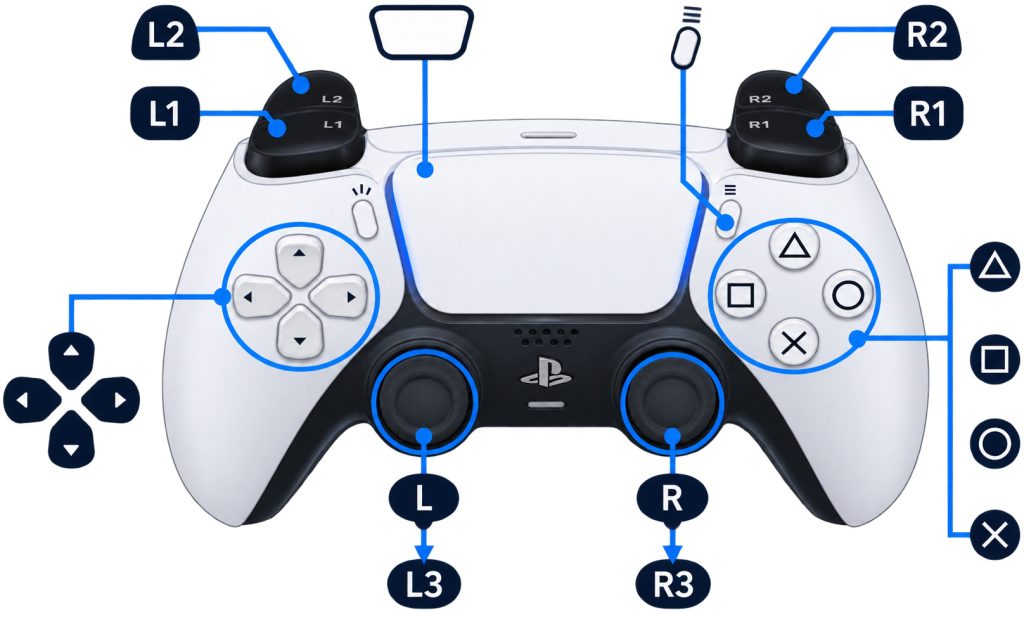
To begin with, it helps to remember the following:
- left analogue stick (L) – move the character forwards, backwards, left and right
- right analogue stick (R) – turn the camera or look around
- L3 – press the left analogue stick down and the character starts running
- (cross) – jump and climb
- (circle) – crouch
- (triangle) – interact with objects, get into and out of a car
- (square) – punch or launch a physical attack
- L2 – aim your weapon
- R2 – shoot
- R1 – take cover
- L1 – hold it down to select weapons and equipment
- touchpad – map
- options – pause and access settings
Incidentally, L3 and R3 aren’t extra buttons you have to look for on the controller. They are the analogue sticks, which you can also press down. Yes, I had to work that out too.
How do you drive a car in GTA 6?
Fortunately, this is a little simpler. At least until I drive into the first lamppost. R2 is the accelerator, L2 is the brake, and you steer with the left analogue stick. Use the cross button for the handbrake, and triangle to get into or out of the car. To sound the horn, press L3. Very useful, although I have a feeling I’ll be using that button rather more often than the brakes.
How can you make GTA 6 easier to play?
This is probably the most important tip for those of us who are a little older and didn’t grow up with a controller in our hands. In the game settings, you can change the camera sensitivity. Reduce the camera turning speed if everything feels too fast and you feel as though you’re about to have an epileptic fit. Also check the Aim Assist settings, which make shooting easier. In Settings – Control Scheme, you can also choose a different button layout, such as Classic.
Above all, there’s no need to start shooting, running from the police and driving at two hundred kilometres an hour straight away. I’d recommend a very simple exercise. First, spend five minutes walking down the street. Then try walking while moving the camera. After that, get into a vehicle and drive around town. Ideally without having a traffic accident at every junction. Only once you’ve mastered these basics should you move on to more demanding tasks.
Am I too old for GTA 6?
I don’t think so. I simply have far less patience than children who use a controller as naturally as I use a keyboard. What amuses me most is that I can use a computer without any trouble and solve fairly complex technical problems. Then someone puts a PS5 controller in my hands and I’m completely lost. But I’m not going to give up so quickly this time. GTA 6 may be exactly the right motivation to learn something new.
If you’re also one of those people who bought a PlayStation with high expectations, only to discover that your fingers are considerably slower than what’s happening on screen, welcome to the club. If you have any advice for older GTA 6 beginners, I’ll gladly read it. Especially if it doesn’t involve using all ten fingers at once. Where have the days of ordinary joysticks and two buttons that could save the entire world gone?